PARROT / DRONE PROFILE
Parrot Mambo FPV
Explore the available technical information for this aircraft, including camera capabilities, flight performance and manufacturer-specific specifications.
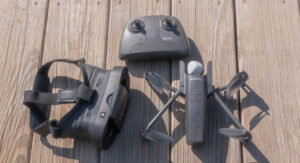
Editorial scope: This profile covers the Parrot Mambo FPV package with its dedicated FPV camera, Cockpitglasses 2 and Flypad. It is not a generic Mambo, Mambo Fly or Mambo Mission specification sheet. Figures below are taken from Parrot legacy documentation and the Mambo FPV user manual; this is a research-based reference, not a hands-on test.
Featured image: original IGIDRONE illustrative artwork. It does not depict the exact Parrot Mambo FPV aircraft.
Parrot Mambo FPV specifications
The Mambo FPV is a small indoor-oriented quadcopter supplied with a 720p FPV camera and headset accessories. The FPV camera streams and records HD video at 30 fps with a 120-degree field of view. The camera-equipped aircraft weighs about 73 g; the bare aircraft is about 63 g.
Flight and battery
The FPV package uses a 660 mAh LiPo battery. Parrot documentation states about 8 minutes of flight with accessories or protective bumpers fitted, and up to 10 minutes without them. Treat these as manufacturer test figures, not guaranteed real-world endurance.
Stabilisation and control
Documented stabilisation sensors include a 3-axis accelerometer and 3-axis gyroscope, an ultrasonic sensor, a pressure sensor and a downward camera used for optical-flow stabilisation. These are not an omnidirectional obstacle-avoidance system. Bluetooth control is listed at approximately 20–30 m with a smartphone in Parrot legacy product-sheet sources (the sheets differ), and up to 100 m with the Parrot Flypad. These are controller-link distances, not aircraft flight-distance claims.
Variant and availability note
The Mambo range includes several packages and accessories. Battery endurance, camera equipment, weight and control range can vary by bundle. Confirm the exact package and local radio requirements before purchase. The Mambo is a legacy/discontinued product; app and accessory compatibility may be limited.
Manufacturer documentation
Parrot Mambo range support and downloads · Mambo FPV user manual copy (FCC filing)
Legacy product status and package identity
The Parrot Mambo FPV is a legacy micro-drone package, not a current equivalent to modern camera or racing systems. This profile refers specifically to the FPV bundle with its camera, Cockpitglasses 2 and Flypad. Other Mambo packages were sold with different accessories, so used-market listings should be checked against the actual box contents and aircraft version.
What it is suitable for
The Mambo FPV was designed for small-scale indoor flying and first-person-view experimentation. Its small size makes it easier to use in a controlled indoor space than a larger aircraft, but the camera and video system should be viewed as an introductory FPV experience rather than a modern high-quality recording solution. Short battery endurance means sessions are brief and require spare batteries and charging time.
Limitations and used-buying checks
Before buying second-hand, inspect the battery for swelling or damage; check propellers, motors, guards, camera mounting, charging equipment and headset condition. Confirm that the Flypad, smartphone, app and headset still work together. Legacy mobile-app and accessory compatibility can be a bigger practical problem than the original specification. Do not assume every listing includes the FPV camera, glasses or controller.
The downward optical-flow and ultrasonic/barometric sensors are stabilisation aids, not an all-direction obstacle-avoidance system. It may interest a hobbyist who specifically wants the original Mambo FPV package and can verify compatibility. Buyers seeking a supported beginner camera drone or current FPV ecosystem should compare newer products.
Source note: Legacy profile based on Parrot historical documentation and the Mambo FPV user manual. Availability, app support and replacement parts should be confirmed before purchase.
Who should consider Parrot Mambo FPV?
Experienced pilots should compare video latency, camera angle, manual control options, frame durability, repairability, battery turnaround and supported recording modes. A cinematic FPV platform and a tiny indoor trainer solve different problems, so match the purchase to the actual flying environment. For Parrot Mambo FPV, verify the exact controller, goggles, battery and firmware pairing before ordering a bundle.
Limitations and trade-offs to understand
Video recording and live-view specifications are not the same thing. The recorded camera may provide a different resolution or frame rate from the goggles feed. Check which system records the footage, what storage it uses and whether the resulting files can be edited on your device. For Parrot Mambo FPV, plan simulator practice and controlled-area flights before attempting speed or proximity manoeuvres.
Alternatives worth comparing
Compare this aircraft with a conventional camera drone if smooth aerial photography is the priority, or with another FPV platform in the same size and skill category if immersive piloting is the goal. For DJI FPV-style buyers, review the Avata family and the DJI FPV platform as separate operating choices rather than interchangeable models. For Parrot Mambo FPV, check the price and availability of propellers, guards, motors and frame parts as well as the aircraft itself.
Pre-purchase and ownership checklist
Before purchase, verify the exact controller and goggles compatibility, battery and charger type, spare propeller availability, repair support, firmware requirements and regional radio compliance. New pilots should plan simulator practice and supervised low-risk flights before attempting high-speed manoeuvres. For Parrot Mambo FPV, distinguish recorded camera quality from the live goggles feed when comparing video specifications.
How to use this specification profile
This page is a research-based reference, not a claim that IGIDRONE has independently flight-tested the aircraft. Treat manufacturer maximums as test-condition figures and distinguish standard equipment from optional accessories or regional bundles. Before buying, compare the exact model code, firmware, battery, controller and payload configuration against the current official manual. If a field is marked unknown or is not documented by the manufacturer, do not infer a value from a similarly named variant. For Parrot Mambo FPV, verify the exact controller, goggles, battery and firmware pairing before ordering a bundle.
Primary manufacturer reference: Open the manufacturer specification or support page. Confirm the current regional documentation before purchase. For Parrot Mambo FPV, plan simulator practice and controlled-area flights before attempting speed or proximity manoeuvres.
Editorial update: 8 November 2026. Model availability, prices, software support and regional operating rules can change. Confirm them with the manufacturer, authorised distributor and relevant aviation authority before purchase or flight. For Parrot Mambo FPV, check the price and availability of propellers, guards, motors and frame parts as well as the aircraft itself.
Drone Specifications
| Brand | Parrot |
|---|---|
| Currency (e.g. USD) | USD |
| Camera | FPV camera; 720p HD video, 120° field of view |
| Maximum Video Resolution | 1280 × 720 at 30 fps (FPV camera) |
| Maximum Flight Time (minutes) | Approx. 8 min with accessories / bumpers; up to 10 min without them minutes |
| Maximum Transmission Range (km) | Bluetooth control: approx. 20–30 m with a smartphone (published product-sheet variation); up to 100 m with Parrot Flypad. Controller link only, not flight distance. km |
| Weight (g) | 73 g with FPV camera; 63 g bare aircraft g |
| Battery Capacity (mAh) | 660 mAh LiPo, 3.7 V mAh |
| Wind Resistance (m/s) | Not published; primarily a small indoor-oriented aircraft m/s |
| Obstacle Sensing | Ultrasonic and pressure sensors plus downward camera for stabilisation; not omnidirectional obstacle avoidance |
| Positioning / GPS | GNSS not listed in cited Mambo FPV documentation |
| Maximum Speed (m/s) | Not published in cited Mambo FPV documentation m/s |
| Folded Dimensions | Approx. 180 × 180 mm with bumpers |
Additional Notes
Mambo FPV package only. Do not transfer specifications to Mambo Fly, Mambo Mission or other Mambo bundles. Endurance depends on accessories and bumpers. Legacy product; app and accessory compatibility may be limited.
Specification source: Official source
Last verified: 2026-11-08
Official Price (USD)
No public USD price was verified on the manufacturer’s official store during this check.
For enterprise or discontinued models, contact the manufacturer for a current quotation. We do not substitute third-party seller prices.
MODEL TECHNICAL RECORD
Detailed Technical Specifications
Manufacturer-specific technical information recorded for this model. Values not present in the source record are not estimated.
Aircraft
| Model/package | Parrot Mambo FPV bundle; FPV camera, Cockpitglasses 2 and Flypad |
|---|---|
| Weight | Approx. 63 g bare aircraft; approx. 73 g with FPV camera |
| Dimensions | Approx. 180 × 180 mm with protective bumpers |
Camera
| FPV video resolution | 1280 × 720 (720p) |
|---|---|
| Video frame rate | 30 fps |
| Field of view | 120° |
| Recording and streaming | Supported |
| Vertical stabilisation camera | Downward camera used for optical-flow stabilisation; distinct from FPV camera |
Flight & battery
| Battery | 660 mAh LiPo, 3.7 V |
|---|---|
| Flight time with accessories/bumpers | Approx. 8 minutes |
| Flight time without accessories/bumpers | Up to 10 minutes |
| Charging time | Approx. 30 minutes with a 2.1 A charger |
Stabilisation sensors
| Inertial measurement | 3-axis accelerometer and 3-axis gyroscope |
|---|---|
| Altitude/stabilisation | Ultrasonic sensor and pressure sensor |
| Optical flow | Downward camera; vertical camera specified at 60 fps in Mambo family presentation |
Control & connectivity
| Smartphone control range | Approx. 20–30 m in Parrot legacy product-sheet sources; published figures differ by sheet. |
|---|---|
| Parrot Flypad control range | Up to 100 m (Bluetooth; controller/package dependent). |
| Wireless | Bluetooth 4.0 BLE; FPV video link uses Wi-Fi |
| GNSS | Not listed in cited Mambo FPV documentation |
Important limitations
| Maximum horizontal speed | Not published in cited manufacturer documentation |
|---|---|
| Maximum wind resistance | Not published in cited manufacturer documentation |
| Obstacle avoidance | No omnidirectional obstacle-avoidance system documented |
| Variant distinction | These values are for the Mambo FPV package; do not copy to Mambo Fly, Mambo Mission or other Mambo bundles. |
MANUFACTURER DATA
Detailed official specifications
Technical figures below are transcribed from the manufacturer documentation linked with this profile. Test figures are maximum or controlled-condition ratings where stated; actual performance varies by configuration and operating conditions. A field is omitted when the cited source does not publish a reliable value.
Manufacturer source last checked: 2026-11-08
Evidence type: Official Parrot manufacturer documentation
Source: manufacturer technical specifications and official support documentation. Regional versions, payloads, batteries, firmware and test conditions can change the stated figures. Check the linked source for the applicable configuration.
Related Parrot drones
Explore other published models from the same manufacturer.