
The Parrot Mambo FPV is a small recreational quadcopter from Parrot’s earlier consumer-drone range. Its appeal was its compact size, protective frame and first-person-view camera option. It was designed for short, close-range flights rather than serious aerial photography. Because it is now a legacy model, the most important buying question is whether the aircraft, battery, controller and app still work together.
Editorial scope: This is a historical product overview based on Parrot’s published information and archived documentation, not a current hands-on test. Package contents and specifications may differ between Mambo versions and regional bundles.
Design and intended use
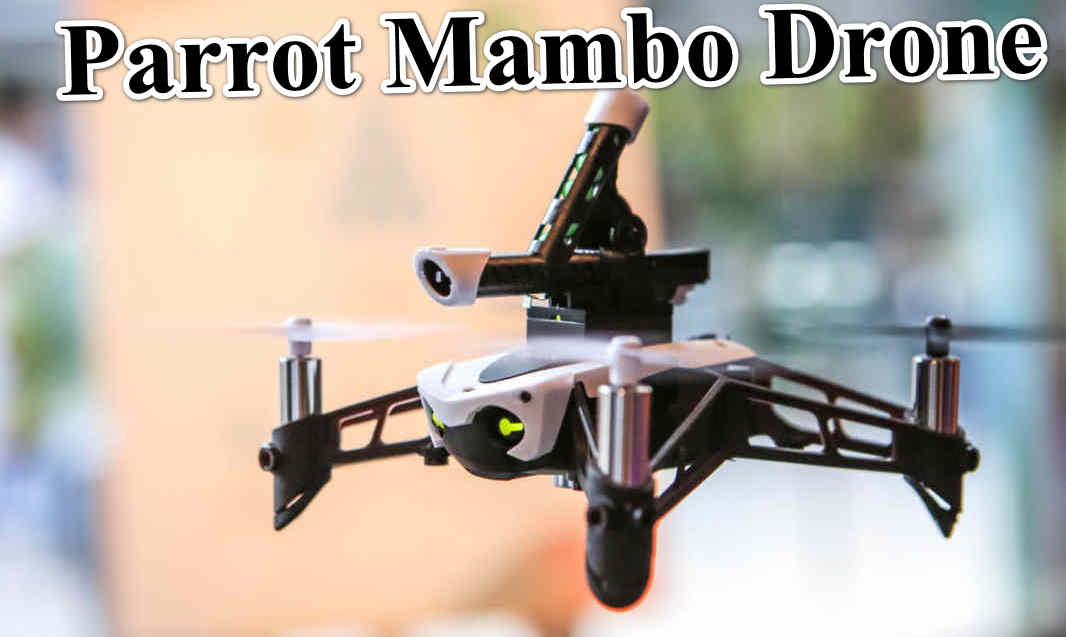
The Mambo FPV is a palm-sized drone intended for indoor and calm-weather recreational flying in suitable open spaces. Its protective bumpers help reduce the chance of propeller contact during beginner practice, but they do not make the aircraft collision-proof. The small frame and lightweight design are useful for learning basic orientation and control, while the short flight time means sessions are best planned as brief practice runs.
FPV camera and video
The FPV package adds a small camera system for a first-person view. Parrot’s published Mambo FPV information lists 720p HD video at 30 frames per second and a wide field of view. This is intended for an immersive flight perspective, not detailed landscape photography or modern creator video. The camera feed and recording experience depend on the exact kit, smartphone and compatible software.
Do not compare the Mambo FPV’s 720p camera directly with modern 4K camera drones. Its value is the lightweight recreational experience, not image resolution, dynamic range or stabilised cinematic footage.
Controls, sensors and flight behaviour
The Mambo uses onboard sensors to assist stability, including inertial sensing, ultrasound, pressure sensing and downward optical-flow support in documented configurations. The smartphone app provides a simple entry point, while the Parrot Flypad controller was offered with some packages for physical control. The published control-distance figures vary by connection method and environment. A maximum radio figure is not a safe operating target and must never be interpreted as permission to fly beyond legal visual line of sight.
Battery and endurance
Historical Parrot specifications list a 660 mAh lithium-polymer battery. Published endurance figures are approximately 8 minutes with accessories or bumpers fitted and up to 10 minutes in a lighter configuration. These are original product figures, not a promise for a used drone today. Lithium-polymer batteries age even when stored; swelling, damage, unusual heat, rapid voltage drop or inconsistent charging are reasons not to use a battery.
Parrot Mambo FPV specifications
| Specification | Published / configuration-dependent information |
|---|---|
| Product type | Mini recreational quadcopter with FPV kit |
| Camera | 720p HD video, 30 fps (FPV package) |
| Field of view | Approx. 120° listed for the FPV camera |
| Battery capacity | 660 mAh LiPo (published Mambo FPV configuration) |
| Flight time | Approx. 8 minutes with accessories; up to 10 minutes in lighter configuration |
| Control options | Compatible smartphone app; Flypad controller in supported packages |
| Control link | Bluetooth with smartphone; controller range varies by package and conditions |
| Stabilisation sensors | IMU, ultrasound, pressure and downward optical-flow sensing in documented configuration |
| Intended use | Short-range recreational flying and beginner practice |
Specification note: Parrot sold different Mambo kits and accessories. Treat the table as a guide to the FPV configuration, not a universal specification for every Mambo, Mambo Mission, Mambo Fly or accessory bundle. Check the archived user guide and the actual unit label before purchasing.
What the Mambo FPV does well
- Very compact and easy to transport.
- Protective bumpers can make beginner practice less intimidating.
- FPV camera adds an immersive perspective for recreational flying.
- Modular accessory concept made the Mambo range distinctive.
- Short practice sessions can help new pilots learn orientation and basic control.
Limitations to understand
- Very short flight time compared with current camera drones.
- 720p FPV imaging is basic by modern standards.
- It is a legacy product, so app, phone operating-system and controller compatibility may be difficult.
- Old batteries may have reduced capacity or may be unsafe to use.
- Replacement parts, accessories and repair support may be limited or unavailable.
Should you buy a used Parrot Mambo FPV?
It may appeal to a collector or someone who specifically wants to restore and operate this model. It is not the best choice for a buyer who needs dependable current-day support, long flight time or high-quality aerial video. Before paying, ask the seller to demonstrate the aircraft connecting to the controller and app, starting its motors, responding to control inputs and recording a camera feed.
Used-drone inspection checklist
- Inspect the battery for swelling, punctures, corrosion or unusual heat. Do not charge a damaged battery.
- Check all propellers, guards, motors and frame arms for cracks or deformation.
- Confirm the exact Mambo package and whether the FPV camera, headset, Flypad and charging cable are included.
- Test app and controller compatibility with the device you plan to use.
- Confirm that the camera feed works and that video can be saved or transferred as expected.
- Ask whether spare batteries and replacement propellers are genuinely available before committing to the purchase.
Parrot Mambo FPV vs a modern beginner drone
A modern beginner drone will generally offer a newer app, improved camera capabilities, longer endurance and more accessible support. The Mambo FPV may still be interesting for its tiny size and historical modular design, but it should be purchased for that specific experience, not because it appears comparable to a current camera drone. Browse the IGIDRONE Parrot catalogue and use the Parrot comparison tool for models included in our database.
Final verdict
The Parrot Mambo FPV is a fun piece of Parrot’s earlier consumer-drone history. Its compact form and simple FPV concept were its main attractions. Today, battery condition, app compatibility and spare-part availability matter more than the original headline specifications. Buy only after a full working demonstration and a careful inspection of the battery and accessories.
Sources and editorial note
Use Parrot’s support and documentation library to locate archived Mambo manuals where available. Historical specifications are configuration-dependent and may no longer reflect the condition of used units. This article is a legacy-product guide, not a recent hands-on test.